Lead Follow Up Automation for Small Business
A lead arrives, the day gets busy, and the inquiry slips into the pile. Lead follow up automation for small business makes the next action visible, assigns an owner, and stops outreach when a prospect responds. VKTIS scopes follow-up systems around your inquiry sources, team structure, and channel permissions.
What Follow-Up Automation Can and Cannot Do
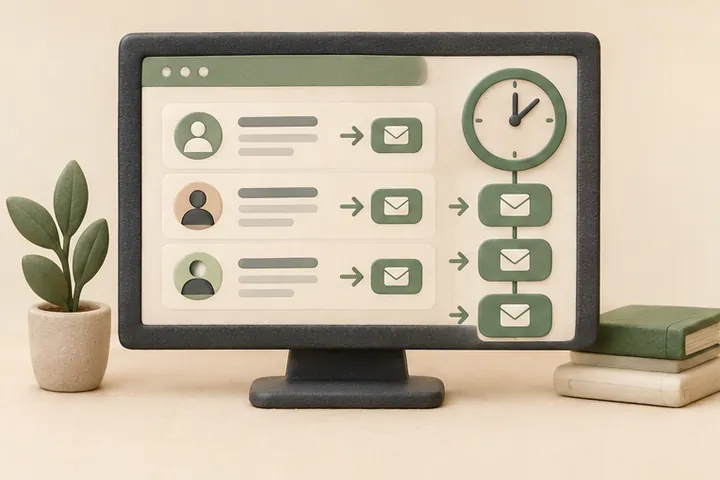
Automation can create a task, route a record, send a permitted message at an agreed time, and pause that sequence when a reply arrives. It cannot decide whether a prospect is a good fit, guarantee that anyone books or buys, or substitute for a capable person responding when the system escalates.
The goal is a relevant next step delivered at a useful moment. That requires clear stop conditions, accurate status tracking, and someone accountable for the exceptions that automation cannot resolve on its own.
Relevance, Timing, and Channel Rules
Not every inquiry warrants the same sequence. A request submitted through a contact form on a Friday evening is a different situation from a missed call during business hours. The timing and channel rules built into the workflow should reflect those differences rather than applying a single cadence to every record.
Internal reminders to staff and customer-facing messages are kept separate in the design. A prompt that appears in your team's task view is not the same as an outbound SMS, and the rules governing each one are treated accordingly.
Ownership, Assignment, and Visibility
A follow-up system without clear ownership produces a shared queue that nobody monitors. Each record should carry an assigned person, a status, and a visible next action. When that action becomes overdue according to your agreed window, the system surfaces it rather than silently advancing to the next automated step.
What a Shared Record Can Hold
Depending on the tools in scope, a record might capture inquiry source, submission time, assigned owner, current stage, contact history, and any opt-out or suppression flags. That context helps the assigned person respond with relevant information rather than starting from scratch.
Stop Conditions, Opt-Out, and Suppression
Stop conditions are not optional details to configure later. They are a core part of the workflow design. Automated outreach should pause when a prospect replies, books an appointment, declines, or asks to stop. It should also pause when an exception occurs that the system cannot resolve, so a person can review the record.
Opt-out handling must be reliable rather than approximate. If a contact opts out through any channel in the sequence, that flag needs to propagate to all related records before the next scheduled action runs. We include suppression and duplicate detection in the scoping conversation for every implementation we support.
Choosing Lead Follow Up Automation Software
Lead follow up software for small business supports the period after an inquiry. A short sequence should end when the contact responds, converts, declines, or asks to stop. Lead nurturing software for small business supports longer communications, with separate requirements for relevance, frequency, permission, and suppression.
Both serve legitimate purposes, but conflating them leads to sequences that continue long after a follow-up should have concluded. VKTIS keeps those functions distinct in scope documentation so that the workflow your team approves matches the outcome you are actually trying to reach.
Home Services and HVAC Companies
Service businesses that operate across multiple job types and technician schedules often receive inquiries through several channels at once. A call, a web form submission, and a social message about the same request can create duplicate records if the intake process is not structured.
For home services and HVAC companies, scoped follow-up automation can create a single task per inquiry, assign it to the appropriate person based on job type or territory, and prompt an internal reminder if the first contact window passes. Automatic outreach stops as soon as the prospect replies or books. See related thinking on the HVAC answering service page and our notes on AI receptionist for plumbers for adjacent considerations around after-hours intake.
Medical and Dental Practices
Practices receive appointment requests through patient portals, web forms, and phone inquiries, each with different handling requirements. Automated follow-up in a healthcare-adjacent context requires careful attention to what information is included in any outbound message, which staff role owns the record, and how quickly the system escalates an unresolved request to a human.
VKTIS does not make clinical recommendations or compliance determinations. Any implementation involving patient communications should be reviewed against the practice's own policies and applicable regulations before deployment. The AI receptionist for dentist page covers related intake considerations worth reviewing alongside any follow-up scope discussion.
Measuring the Pipeline, Not Just Activity
Response time, overdue task count, stage completion rate, and opt-out volume are measurable from day one of a properly configured system. Booking and revenue attribution require reliable tagging, enough inquiry volume to produce meaningful patterns, and a consistent period of clean data before conclusions can be drawn responsibly.
Vanity activity metrics, such as messages sent or open rates, are easy to report but easy to misread. VKTIS recommends agreeing on a small set of pipeline-stage metrics before implementation so the reporting your team reviews after launch reflects the questions that actually matter to the business.
Maintenance, Exceptions, and Ongoing Ownership
A follow-up workflow is not a set-and-forget installation. Staff changes, new inquiry sources, updated channel rules, and shifts in your service offering each create conditions that can make an existing sequence inaccurate or inappropriate. The implementation scope should include an agreed process for reviewing and updating the workflow, not just a launch handoff.
VKTIS supports scoped maintenance arrangements and workflow reviews through our business consulting and operations support services. If your situation calls for a broader look at automation readiness before committing to an implementation, the automation readiness assessment is a practical starting point. Implementation details and associated costs are outlined on the pricing page.
What a Scoping Deliverable Actually Contains
Before any workflow is built, VKTIS produces a written scope document that your team reviews and approves. That document identifies each inquiry source in scope, the assigned owner for each stage, the permitted outreach channels, the agreed timing windows, and the specific stop conditions that will end automated activity. It is a working reference, not a sales proposal.
Source and Permission Inventory
The scope document lists every form, booking widget, or CRM record connected to the workflow, along with the consent basis for each one. If a source cannot be confirmed as carrying appropriate permission, it stays out of scope until that question is resolved by the business owner or their appropriate advisor.
Stop Condition Register
Each automated action in the workflow is paired with its corresponding stop conditions in the same document. That pairing prevents a situation where stop logic is assumed to be in place but was never explicitly configured. The register becomes the reference point for any future maintenance review.
A Worked Example: HVAC Estimate Request
This is an illustrative example of how a scoped workflow might operate, not a description of an actual deployment.
A homeowner submits a web form requesting an estimate for a furnace replacement on a Thursday evening. The form sits on a domain the HVAC company owns, and the submission carries consent for follow-up contact. The workflow creates a single task record, assigns it to the on-call coordinator based on territory rules configured during scoping, and schedules an internal reminder for the following morning during business hours.
What Happens When the Prospect Replies
If the homeowner replies to a permitted outreach message before the first internal reminder fires, the automated sequence pauses and the task status updates to reflect the response. No additional outbound message goes out. The assigned coordinator sees a record showing the inquiry source, submission time, response received, and the next action waiting for a human decision.
What Happens When No Response Arrives
If the coordinator does not mark the record as contacted within the agreed window, the system surfaces an overdue flag rather than sending additional automated outreach on behalf of the business. A second automated message, if included in the approved sequence, only sends if the scope document explicitly authorized that step and the stop conditions have not been met. That distinction between surfacing a task and triggering outreach is established during scoping, not inferred at runtime.
Comparing Two Approaches Before You Build
Small businesses evaluating follow-up automation often face a practical choice between a lightweight task-and-reminder configuration and a more connected workflow that routes records, updates CRM status, and handles suppression across channels. Neither approach is universally better; the right fit depends on inquiry volume, team size, and how many sources feed into the pipeline.
Lightweight Task and Reminder Setup
A task-and-reminder configuration is appropriate when inquiry volume is manageable, a single person owns most follow-up, and the main problem is visibility rather than routing. The primary risk is that it does not scale gracefully if volume increases or ownership spreads across multiple staff members. It is also less useful if duplicate submissions across channels are a recurring issue, because deduplication typically requires a more connected record structure.
Connected Workflow with Routing and Suppression
A connected workflow that touches your CRM, handles assignment by rule, and propagates opt-out flags across records is more capable but also more surface area to configure, test, and maintain. It is worth the additional scope investment when your team includes more than one person handling follow-up, when inquiries arrive through several channels simultaneously, or when a previous system produced duplicate outreach or missed stops. The automation readiness assessment can help clarify which approach fits your current situation before a build decision is made.
Cost Components Worth Understanding
Scoped implementation work through VKTIS involves consulting time for mapping, design, and testing, plus any platform subscription costs your business carries directly. Those two categories are separate. VKTIS does not mark up third-party platform costs, and the consulting scope is agreed before work begins rather than invoiced open-endedly. Maintenance and workflow review work, if needed after launch, falls under a separate arrangement rather than being bundled into the initial implementation. The pricing page covers how VKTIS structures that work.
Give staff an easy pause control and a visible reason for each scheduled action. Before resuming a paused sequence, check whether the customer has replied elsewhere. This helps prevent an old automation schedule from overriding a newer conversation.
Your Next Step
Walk through one inquiry source with us: where it comes from, who is currently responsible for the response, and where follow-up tends to stop today. That conversation typically surfaces the assignment gap or stop-condition problem worth solving first.
To start that conversation, book a 15-minute intro call or reach out through the contact page. Please do not include sensitive personal or patient details in any contact form submission.