AI Receptionist for Dentist Offices: Administrative Support with Clear Boundaries
Your front desk handles check-ins, insurance paperwork, and patient questions all at once. When the phone rings during a busy morning, routine administrative calls compete directly with the people already in your waiting room. A well-scoped AI receptionist for dentist offices can handle approved office information and appointment requests while your staff stays focused on the patient in front of them.
VKTIS designs a virtual dental receptionist service around your practice's setup. We scope the work before building, test representative call types, and keep clinical decisions with your licensed team. The goal is a focused administrative system, not a replacement for human judgment.
General Dentistry: Reducing Repetitive Front-Desk Calls
A general dentistry practice typically fields the same administrative questions throughout the week. When are you open? Where are you located? Do you take new patients? How do I request a cleaning or a checkup? These questions have approved, consistent answers that do not require clinical judgment to deliver.
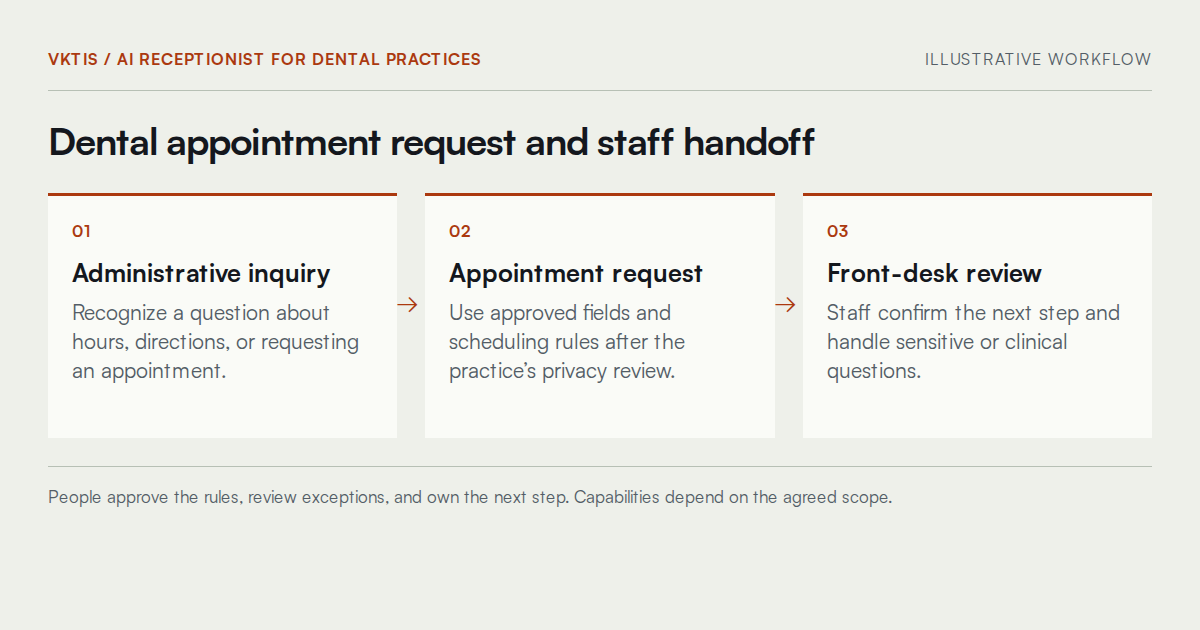
An illustrative example: a caller asks about Saturday hours and wants to request a routine cleaning appointment. The assistant provides approved hours from your public information, captures the request using only authorized contact fields, and routes it to the front desk for confirmation. Staff review the request and complete the booking. No appointment is marked confirmed without that human step.
This kind of workflow, properly scoped and tested, can give your team a defined path for routine inquiries without removing their control over the schedule.
Orthodontic Practices: Inquiry Routing and New-Patient Flow
Orthodontic practices often manage a high volume of new-patient inquiries, especially from parents researching options for a child. Many of those calls begin with administrative questions: what ages do you treat, what is the process for an initial consultation, and how do I request an appointment?
An AI receptionist for dental appointments in an orthodontic context could handle the front end of that inquiry, collect the approved contact details, and queue the request for staff follow-up. As an illustrative example only: a parent calls after hours asking about consultation availability for a teenager. The assistant confirms it can pass a callback request to the scheduling team the next business day and collects only the approved fields.
Keeping Treatment Discussions with Your Staff
Orthodontic treatment involves clinical evaluation, and questions about specific appliances, treatment timelines, or payment plans require a knowledgeable team member. The assistant's role ends at the administrative handoff. Staff handle the substance of any treatment conversation.
Cosmetic Dental Offices: Managing Inquiry Volume for Elective Services
Cosmetic dental offices frequently receive inquiries about procedures like whitening, veneers, or smile consultations. These callers often want to know basic information before committing to an appointment. They may also be comparing practices, so a clear and professional first response matters.
The assistant can provide approved public-facing information about how to request a consultation or what to expect from an initial visit. It cannot describe clinical procedures, quote specific outcomes, or make promises about what a consultation will determine. An illustrative example: a caller asks how to get started with a smile consultation. The assistant explains the intake process and offers to capture a callback request, then routes that to the front desk with the approved details.
Cosmetic practices also tend to value a consistent tone and brand voice in every patient interaction. VKTIS configures the greeting, language, and escalation phrasing to match your practice's communication standards before anything goes live.
Patient Confidentiality and Privacy Review
Any patient-facing deployment requires a thorough review of the workflow, the vendors involved, data access controls, retention policies, and applicable agreements before handling patient information. This page does not certify HIPAA compliance. That determination belongs to your legal and compliance team, supported by vendor documentation and a proper risk review.
VKTIS treats privacy review as a launch requirement. We identify what information the assistant may collect, how it is routed, where it is stored, and who has access. Your authorized advisors assess applicable requirements and vendor agreements. If a proposed integration cannot meet those requirements, it should remain out of scope until an acceptable alternative is approved.
What the Contact Form Should Not Contain
When contacting VKTIS about a dental office project, please do not include patient names, health information, insurance details, or any personally identifiable patient data. Use your practice name and a general description of your needs.
Testing and Acceptance Before Launch
We work through sample calls together before any workflow goes live. That includes an ordinary administrative inquiry, a new-patient request, a scheduling change, and a scenario where a transfer or integration fails. Each scenario has a defined expected outcome and a documented fallback.
Acceptance criteria are agreed on in advance: what the assistant should say, what it should not say, how it routes a clinical question, and what happens when the scheduling system is unavailable. Your team reviews the results, and we adjust before launch. Nothing is deployed until your authorized staff confirm the workflow meets the agreed standard.
Maintenance, Handoffs, and Ongoing Oversight
Launching a workflow is not the end of the engagement. Call types change, office hours shift, staff responsibilities change, and your scheduling rules may be updated. VKTIS can scope an ongoing support arrangement to review the assistant's performance, update approved information, and address exceptions that surface after launch.
Staff handoff completion, appointment-request accuracy, and exception frequency are useful things to track. We help you define what to measure during a pilot phase so your team can make informed decisions about whether to expand the workflow or adjust the boundaries. See workflow audit services for how we approach that kind of structured review.
What the Scoping Deliverable Actually Includes
When VKTIS completes a scoping engagement for a dental office, you receive a written document, not just a conversation summary. That document identifies the specific call types the assistant will handle, the exact fields it may collect, the escalation protocol for clinical questions, and the vendor or platform approach under consideration. It also lists the open questions that need answers from your team, your IT contact, or your legal counsel before a build can begin.
This deliverable gives your practice something concrete to review before authorizing development. Scoping may itself be a paid engagement; its terms should be agreed in advance. Share the document with your office manager, compliance contact, or scheduling vendor for feedback. It informs a proposal that assigns responsibilities, defines the pilot, and clarifies what VKTIS will and will not build.
What Happens After You Receive the Scoping Document
Your team reviews the document and identifies anything that needs correction or adjustment. Common changes at this stage include narrowing the approved information list, removing a proposed integration that your vendor does not support, or adjusting the escalation phrase to match how your staff prefer to be reached. A revised proposal follows, and no build begins until both sides have agreed in writing on the scope.
How to Compare Your Options Before Deciding
Dental practices considering an AI receptionist for dental appointments typically encounter three broad options: a general-purpose chatbot or voice tool, a dental-specific software product, and a scoped custom implementation like what VKTIS designs. Each has a different cost structure, configuration flexibility, and maintenance burden.
Compare each option against your actual call types, scheduling system, privacy requirements, and staff handoff process. A general-purpose tool may need additional configuration; a dental-specific product may still have integration limits. Custom work offers control over agreed requirements but creates maintenance responsibilities. Check setup effort, recurring charges, support terms, and testing requirements individually rather than assuming one category is faster or cheaper.
Where a Scoped Approach Has the Most Value
A scoped implementation makes the most sense when your practice has a distinctive setup that off-the-shelf tools handle poorly. That includes multi-provider offices with complex scheduling rules, practices with high inquiry volume for a specific service line like cosmetic consultations, or offices where the handoff protocol between front desk and clinical staff is already well-defined and needs to be respected precisely. If your situation is straightforward and your volume is low, a lighter option may be sufficient, and an honest scoping conversation at VKTIS will surface that.
A Practical Failure Scenario and How It Gets Handled
Consider an illustrative example where an AI receptionist for dentist offices is deployed and a patient calls after hours to ask about a dental emergency. The assistant was scoped for after-hours administrative requests only. If the emergency scenario was not addressed during testing, the assistant might attempt to capture a callback request rather than directing the caller to emergency resources your practice or local care network provides.
Address this risk during scoping rather than after launch. Include urgent-sounding calls in acceptance testing and define practice-approved instructions before deployment. Test the handoff and the fallback when a transfer fails or nobody answers. The assistant is not an emergency service and must not imply that help has been dispatched. Your authorized team approves the response boundaries; the assistant does not assess clinical urgency. Our business consulting and operations support page explains the wider planning approach.
Adoption Guidance for Front-Desk Staff
A new administrative workflow needs informed front-desk staff. Include a plain-language handover summary in the agreed scope: what the assistant handles, how a transfer appears, and what to do if something behaves unexpectedly. Staff should practice taking over an inquiry and reporting a problem. Confirm who maintains that guidance and who supports the office after launch.
Keep Appointment Requests Clear
Different visit types may require different scheduling rules. A general cleaning request, an orthodontic adjustment inquiry, and a cosmetic consultation should not all receive the same availability message. Document the approved administrative categories and let staff resolve requests that do not fit them.
Confirm what the caller hears after submitting a request. The message should distinguish receipt from confirmation, explain the next administrative step, and identify a clearly stated contact alternative. During testing, ask a staff member unfamiliar with the setup to explain what they believe has been booked. If the wording implies a confirmed visit when none exists, revise it before launch and retest.
A Useful First Step for Your Practice
The right starting point is a focused conversation about what your front desk handles today and which part of that workload has a clear administrative answer. VKTIS offers a 15-minute intro call to discuss your current setup, the types of calls your team fields most often, and whether an AI receptionist for dental practices fits your situation.
No purchase is required from that conversation. You will leave with a clearer picture of what a scoped implementation could look like, what questions need answers before a proposal, and what a realistic pilot might involve. Visit contact VKTIS or schedule directly at cal.com/vktis/vktis-intro-call to plan your intro call.