AI Receptionist for Plumbers: Phone Intake While Your Crew Stays on the Job
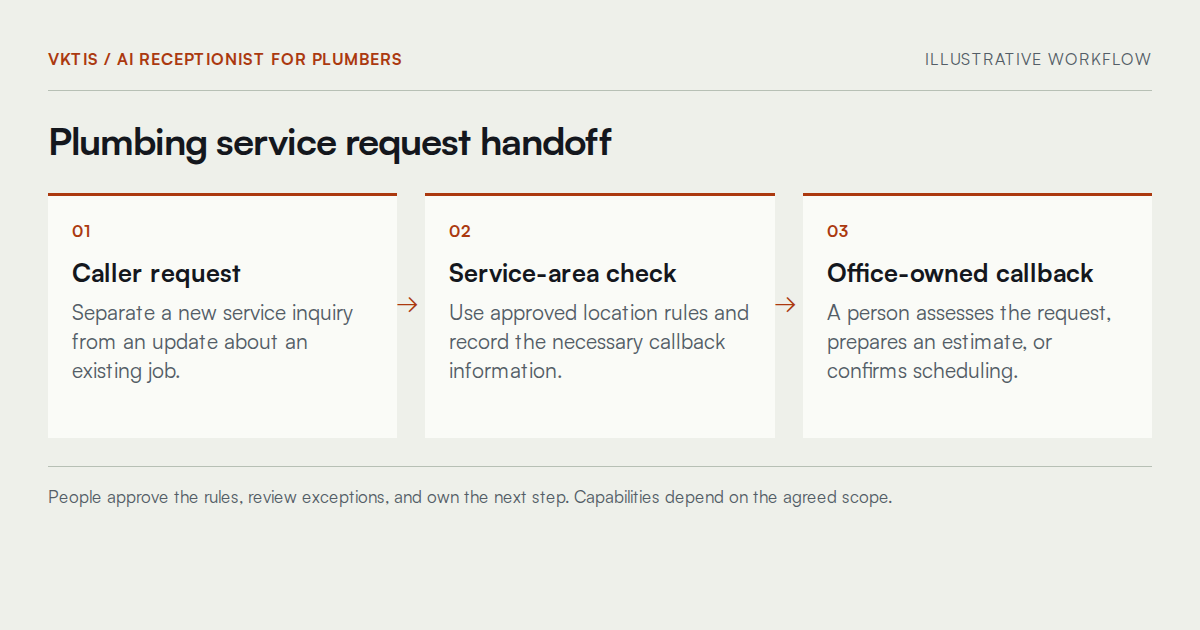
Running a plumbing business means phones ring whether your crew is mid-repair or wrapping up a drain cleaning call across town. An AI receptionist for plumbers can handle routine phone intake, collect the caller's stated issue, confirm service area eligibility, and prepare a callback request for your office staff to own. It should not diagnose a problem, offer repair instructions, quote a job, or promise a technician is on the way. Those decisions belong to people.
This page explains how VKTIS approaches scoping, building, and maintaining a plumbing business phone answering service that supports your office rather than replacing its judgment.

Residential Plumbing Intake
Capturing the General Request
Residential plumbing callers tend to describe symptoms: a dripping faucet, low water pressure, a water heater that stopped working. The intake workflow records the caller's description as stated, without interpreting it or offering a cause. That record gives your office context before the callback happens.
Service Area Verification
A residential caller outside your coverage area should hear a clear, polite response and, where applicable, a referral path your business has approved in advance. The assistant checks location eligibility against your defined rules and does not improvise exceptions.
Callback Information
The workflow captures the callback number and the preferred time window the caller provides. Creating a callback task is not the same as booking a job. Your office staff confirm availability, prepare any necessary assessment questions, and decide how to respond.
Drain Cleaning Call Handling
Distinguishing a Routine Request from an Urgent One
Drain cleaning inquiries range from planned maintenance to urgent-sounding descriptions. Use approved screening language, not technical judgment. A slow drain inquiry can enter the standard callback queue. Other descriptions should trigger the approved handoff attempt, with clear fallback instructions if the designated person cannot be reached.
Avoiding Duplicate Records
Drain cleaning inquiries sometimes generate repeat calls before the office responds. Defined matching rules can flag potential duplicates for review. AI voice receptionist for plumbers workflows should retain separate jobs when the same caller reports different problems, rather than merging every matching phone number automatically.
Emergency Plumbing Call Coordination
What the Intake Can Support
AI customer service for plumbing companies can support call coordination by recording the caller's description and attempting an approved human handoff. Notify the person assigned to after-hours coverage and record whether the transfer connected. This is administrative support, not a guarantee of emergency response.
What It Cannot and Should Not Do
The assistant must not assess danger, offer repair instructions, or claim a technician is dispatched. For urgent-sounding descriptions, use business-approved escalation language and attempt the designated handoff. Test failed transfers and clearly communicate unavailable coverage. This administrative assistant is not an emergency service; the scope must not suggest otherwise.
Human Ownership of Urgency Assessment
Your staff, not the assistant, evaluate whether a job qualifies as an emergency under your business's definition, what response is appropriate, and what to tell the caller about timing. No implementation VKTIS builds will circumvent that boundary.
Building and Testing the Workflow
Intake Logic and Routing Rules
The build phase translates your approved scoping decisions into a working intake flow. That includes service-area check logic, call categorization, the language the assistant uses at each step, and the routing paths for standard, urgent, and after-hours situations. Nothing is assumed from a template without your review.
Testing Against Real Scenarios
Before the workflow handles live callers, VKTIS tests it against representative scenarios drawn from your business: a new residential inquiry during business hours, a drain cleaning callback request after hours, and an urgent-sounding caller description that should trigger immediate human escalation. Testing is iterative, and your team reviews the outputs before anything goes live.
An illustrative example (not a client result): a caller describes a leaking fixture while the crew is finishing another job. The workflow captures the general description, confirms the location is within the service area, records a callback number, and routes a task to the office. The office staff call back, assess the job, and respond accordingly.
Maintaining the Workflow Over Time
A plumbing business changes its service area, adjusts office hours seasonally, adds or removes staff, and refines how it wants urgent calls handled. The intake workflow should reflect those changes rather than drift out of alignment with how your operation actually runs.
VKTIS builds maintenance into the engagement scope rather than treating it as an afterthought. When your approved routing rules change, the workflow should be updated by an authorized person, reviewed, and tested before the change affects live callers. If you're evaluating how your current tools support this kind of ongoing accuracy, a workflow audit can be a useful starting point.
What Stays With Your Team
Repair Advice and Diagnosis
No part of the intake workflow offers any interpretation of what might be wrong with a caller's plumbing system. Your technicians and office staff hold that knowledge and professional responsibility.
Pricing and Scheduling Commitments
Unless your business explicitly approves a general pricing disclosure and VKTIS scopes it carefully, the assistant does not quote jobs. Scheduling confirmation, job acceptance, and technician assignment remain with your office. See the pricing page if you want to understand how VKTIS structures implementation engagements.
After-Hours and Emergency Decisions
After-hours call handling requires a clear, pre-approved chain of escalation. Your business defines who is reachable, under what conditions, and what the assistant communicates when that person is not immediately available. VKTIS designs to those instructions; your team owns the decisions they represent.
Related Services Worth Reviewing
A plumbing intake workflow rarely exists in isolation. If your office currently misses calls and doesn't follow up, a missed-call text-back process may be worth examining alongside the intake build. If your leads enter a CRM but callbacks don't get tracked consistently, CRM integration may be part of the conversation. For businesses that want to understand where automation could realistically help before committing to a build, an automation readiness assessment offers a structured starting point.
VKTIS also works with other field service businesses on similar phone intake challenges. The HVAC answering service page covers comparable scoping considerations for that industry.
What the Scoping Deliverable Actually Looks Like
Before any build begins, VKTIS produces a written intake specification document that your team reviews and approves. That document covers every decision the assistant is expected to make on its own, every scenario it escalates to a person, and the exact language it uses at key points in the conversation.
What the Specification Covers
The document defines service area rules, request categories, routing paths, and conditions for attempted human handoff. It also records what happens when a caller's input does not fit a category. Review representative call data to identify ambiguous descriptions rather than assuming every caller will follow a predictable script.
How Your Team Uses It
The specification serves as the review baseline during testing and the update reference when your business changes. If your service area expands or your after-hours coverage changes hands, the specification is what gets revised first. That keeps the workflow accountable to a written record your team owns rather than to assumptions inside a configuration file no one has reviewed recently.
A Worked Intake Example for a Drain Cleaning Request
To illustrate how the intake logic might behave in practice, consider this example. A caller reaches your business on a weekday afternoon while your two technicians are both on residential jobs.
How the Workflow Handles the Call
The caller states they have a slow-draining kitchen sink and are located in a zip code your business serves. The assistant confirms the location falls within your approved service area, asks for a callback number and preferred time, and records the caller's description as stated without characterizing severity. The workflow creates a callback task in your office queue with those three data points and ends the call.
Your office staff see the task, note the description, and call back when available. They ask any job assessment questions they consider necessary, confirm the appointment, and assign the visit. The assistant contributed organized information; your office made every decision that followed.
What This Example Does Not Represent
This scenario is illustrative. It represents one common path through a well-scoped intake workflow, not an outcome VKTIS has measured or guaranteed. Real calls involve callers who don't describe their issue clearly, callers who provide a location that sits on your service area boundary, and callers who become frustrated with a structured intake when they expected to speak with a technician immediately. Those scenarios are part of what scoping anticipates and testing exercises.
Understanding the Cost Components of a Plumbing Intake Build
Plumbing businesses evaluating this kind of implementation often want to understand what they are actually paying for before committing. The cost of a scoped AI receptionist for plumbers typically has several distinct components, and each reflects real work rather than a single software subscription.
Scoping and Specification
The scoping phase produces the specification document described above. That work involves structured conversation with your team, review of your current intake process, and documentation of the rules and limits the assistant will operate under. It takes time and produces something your business owns regardless of what you build afterward.
Build, Configuration, and Prompt Work
The build phase translates the specification into a working intake flow. That includes the logic rules, the language the assistant uses, the routing paths, and the integrations your office workflow requires. Configuration decisions made here affect how the assistant performs under conditions that don't match the most common scenario, so thoroughness matters more than speed.
Testing and Iteration
Testing against realistic call scenarios takes multiple rounds before a workflow is ready for live callers. Each round surfaces edge cases your scoping may not have fully captured, and iteration on those cases is part of responsible implementation rather than a sign the first version failed.
Ongoing Maintenance
A workflow that accurately reflects your business in its first month may not reflect it six months later without upkeep. Agree on maintenance responsibilities before launch. Our pricing page explains how VKTIS structures these components across an engagement.
Test background noise and incomplete addresses alongside clear calls. Staff should receive the original caller description and see which details still need confirmation before making any commitment.
A Useful First Step
The most productive starting conversation focuses on your current callback process and where it breaks down, not on features. Describe how calls reach your office today, who owns the callback, and what happens when the crew is unavailable. That's enough to outline a realistic scope.
If you're ready to have that conversation, book a 15-minute intro call or reach out through the contact page. The call focuses on your intake and handoff process, not on dispatch automation or emergency response guarantees.