Cloud Migration Services for Small Business
Cloud migration services for small business should start with a practical question: should this workload move at all? A cloud move is not automatically cheaper, safer, or compliant. Before selecting a destination, document what currently runs, who relies on it, and how work would recover after a failed transition. VKTIS offers cloud migration consulting for small business and scoped implementation support to help owners evaluate these decisions before committing.

What an Inventory Actually Covers
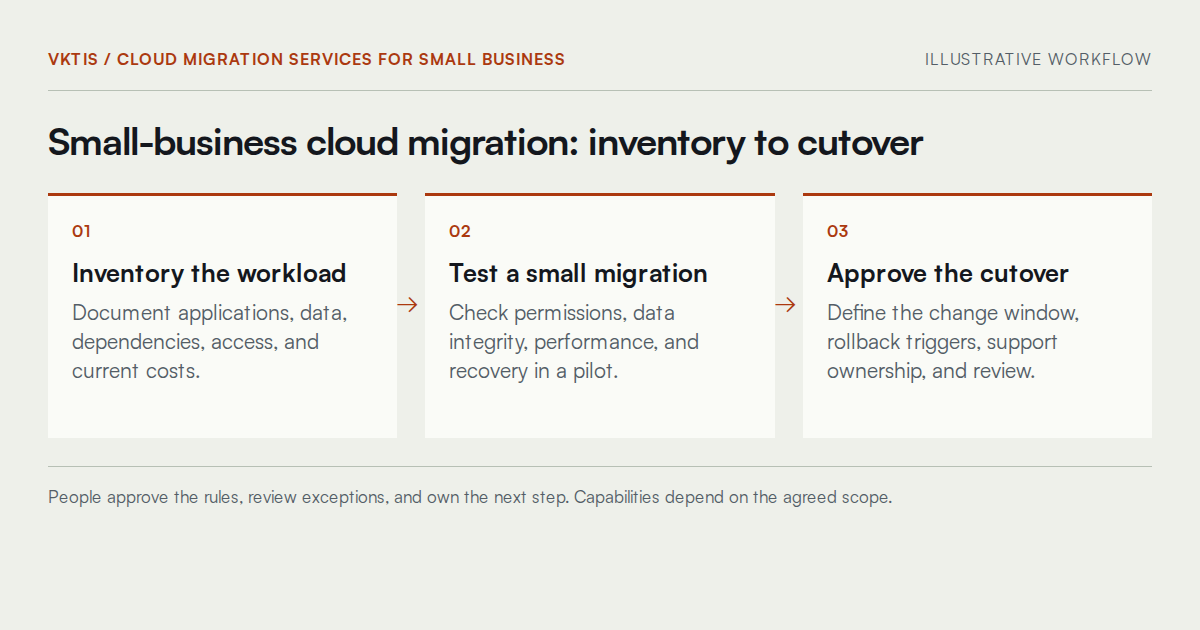
Incomplete discovery can leave important dependencies untested. An inventory should document applications, their data, connected systems, access arrangements, and current operating costs. Confirm the inventory with staff who use those tools, not only with the person who originally installed them.
That last point matters. Subscriptions, support contracts, backup storage, and data transfer fees all belong in the comparison. A cloud migration company for small business that skips this step leaves the client without a reliable cost baseline to evaluate whether the proposed destination makes financial sense.
Identifying Hidden Dependencies
Shared folders, local printers, legacy databases, and downstream integrations can create hidden dependencies. Map and test these connections before the pilot rather than discovering them during cutover.
Data Preparation and Backups Before You Move
A migration is not the moment to discover that the current backup was never tested. Before any data moves, the preparation phase should confirm that a complete, restorable backup exists, that the restore process has been tested with actual files rather than assumed, and that the backup is retained in a location separate from both the source and the destination.
Data preparation also includes identifying records that require specific handling before transfer. Sensitive operational data, patient records in medical and dental settings, and financial files each carry contractual or regulatory considerations that a general migration workflow cannot resolve automatically. Those questions belong to a qualified specialist, not a checklist.
Pilot Migration and Acceptance Testing
A pilot migration moves a bounded workload, not the whole business. The purpose is to surface access errors, integration failures, and data integrity issues in a controlled environment where the consequences of failure are contained.
Acceptance testing during the pilot should cover user task completion against defined criteria, integration behavior with connected systems, and at least one documented restore test from the new environment. Cloud migration solutions for small business that skip the pilot phase trade a manageable problem for a potentially serious one.
What a Pilot Does Not Guarantee
A successful pilot reduces risk. It does not guarantee that a full cutover will behave identically, particularly where workloads interact with external systems or where user volume differs significantly from the test group.
Cloud Migration for Home Services Businesses
Home services businesses often run a combination of scheduling software, customer records, job management tools, and payment processing, sometimes across more than one device type. A migration in this context means accounting for field access requirements, offline scenarios, and integration with tools like booking or dispatch systems.
The AI receptionist for plumbers page covers related considerations around call handling and operational continuity. For home services businesses evaluating a broader operational shift, a workflow audit can clarify which workloads are good migration candidates before a destination is chosen.
Cloud Migration for Medical and Dental Practices
Medical and dental practices handle information subject to specific contractual and regulatory requirements that a cloud migration cannot resolve by itself. Moving patient records, billing data, or practice management systems to a cloud environment requires review of data handling agreements, access controls, retention policies, and the responsibilities of any vendor involved.
VKTIS does not make compliance determinations. A qualified legal or compliance professional should review any migration plan involving protected health information before the work begins. The AI receptionist for dentist page discusses adjacent operational considerations for practice front-office workflows.
Cloud Migration for HVAC Companies
HVAC companies typically manage customer records, service history, technician scheduling, parts inventory, and sometimes subcontractor access across a mix of tools that accumulated over time rather than being selected as a system. A migration for this kind of business requires mapping those tools against each other before deciding which ones should move, which should be replaced, and which should stay on existing infrastructure.
Field connectivity is a practical constraint. If technicians rely on a system while off-site, the migration plan must account for mobile access, sync behavior, and what happens when connectivity is unreliable. The HVAC answering service page covers related continuity considerations for customer-facing operations.
Cutover, Rollback, and Human Accountability
The cutover plan should exist in writing before the change window opens. It needs to define who approves the go decision, what conditions trigger a rollback, how users are notified, and who owns support during and immediately after the transition. No cutover plan eliminates the possibility of problems, and no migration engagement should promise zero downtime as a default outcome.
Rollback criteria are as important as the cutover steps themselves. If the new environment is not ready, the business should have a documented path back to the previous state, not a verbal understanding that something can probably be reversed. The implementation owner controls those decisions; they are not automatic.
Recurring Cost, Ownership, and What Comes After
The migration ends when the team can work normally in the new environment, backups are confirmed, access is validated, and the support model is agreed. That is not the same as the day the files arrive.
Ongoing ownership means someone at the business understands the subscription structure, monitors usage costs against the budget, and knows how to request support when something breaks. Cloud migration services for small business that end at cutover without a handover plan leave the client responsible for a system they may not fully understand yet. Cost and ownership reviews, particularly in the first few months, help catch billing surprises and access drift before they become larger problems. The pricing page and business consulting and operations support pages describe how VKTIS structures ongoing engagements.
What the Scoping Deliverable Actually Looks Like
Before any vendor is selected or pilot scheduled, VKTIS produces a written scoping document that summarizes what was found, what it would take to move it, and where the significant decision points lie. That document is not a sales proposal. It is a structured record of the current environment, the identified dependencies, the open questions requiring specialist input, and the conditions under which a migration is likely to go well or poorly.
The scoping deliverable should be legible to a business owner, not just a technical reviewer. It covers the workloads under consideration, the access and permission structure, the backup status, the vendor relationships in play, and a rough breakdown of what ongoing cloud costs would look like compared to the current state. Having that document in hand before signing a migration contract gives the buyer a basis for evaluating what any provider is actually proposing.
What Stays Out of Scope
The scoping document identifies decisions that belong to qualified specialists outside VKTIS, including compliance reviews for regulated data, legal review of vendor agreements, and any clinical or safety-related system requirements. Flagging those boundaries early is part of what makes the document useful.
A Worked Example: Scheduling and Records Migration for a Small HVAC Company
Consider a small HVAC company running customer records in a locally installed database, technician schedules in a shared spreadsheet, and invoicing through a separate desktop application. Each system was added independently over time, and none of them were designed to work together. The business owner wants to move to a cloud-based field service platform and assumes it will be straightforward because the data volumes are modest.
The scoping work in this kind of scenario typically surfaces several complications before the pilot begins. The local database may use a proprietary export format that does not map cleanly to the target platform's import structure. The shared spreadsheet likely contains informal conventions that break when imported as structured data. The invoicing application may integrate with an accounting tool that the new platform supports only through a third-party connector, which carries its own subscription cost and its own points of failure. None of these problems are unusual. All of them are significantly easier to address during scoping than after the first data transfer attempt.
Why This Example Is Illustrative, Not a Guarantee
This scenario is offered as an example of the kinds of issues scoping commonly surfaces in field-service environments. It does not represent a specific past engagement or predict outcomes for any particular business.
Evaluating Providers: What to Compare Before Committing
Compare providers on the work included, not just their label. General IT companies, platform specialists, and consulting firms may offer different combinations of assessment, configuration, migration, training, and support. Ask each candidate to identify exclusions and vendor relationships. Review whether the proposal covers your actual operational tasks rather than assuming a broad service description includes every dependency.
A platform specialist may be appropriate when a destination is already selected and the requirement is clearly defined. An assessment may be more useful when the business is still deciding what to move. In either case, request evidence that the proposed team understands your dependencies and recovery requirements. Compare deliverables, acceptance tests, account ownership, and support responsibilities on the same basis before deciding.
What to Ask Any Provider
Ask whether a written inventory of current systems and dependencies is included before any migration work begins. Ask how rollback is handled if the cutover goes wrong, who owns that decision, and what conditions define a failed cutover. Ask for a breakdown of estimated ongoing costs that includes storage, egress, support tiers, and any third-party connectors, not just the headline subscription.
Plan how the old environment will be retired only after acceptance and retention requirements are satisfied. Confirm which records must remain accessible, who approves removing access, and how retained archives will be searched by authorized staff members. Closing subscriptions too early can interrupt recovery or historical reporting. Keeping everything indefinitely can create unnecessary cost and confusion. Record the retirement decision separately from the initial cutover approval.
A Useful First Step Before Committing to a Move
Choose the workload before choosing the destination. First establish whether migration is practical given your dependencies, data requirements, support capacity, and tolerance for interruption. A clear reason to retain an application is as useful as a plan to move it.
If you are evaluating a move for your business, the useful starting point is a conversation about the workload, not a proposal. Bring a description of what you currently run, who uses it, and what your tolerance for disruption looks like. From there, an assessment can identify what needs to be resolved before a pilot makes sense.
Book a 15-minute intro call to discuss your setup, or contact VKTIS if you prefer to describe your situation in writing before scheduling.